How to Set Swiss Gear Luggage Lock Easy Instructions
Align the dials to the current code (usually 0-0-0), line them up with the indicator, then locate and press the small reset button or pinhole with a paperclip. While holding it, turn the dials to your new three-digit combination, release the reset, and scramble the numbers to lock. Test your new code several times before travel and keep it written down in a secure spot. Continue for tips on TSA access, troubleshooting and maintenance.
Quick Steps: Set Your Swiss Gear Lock Now
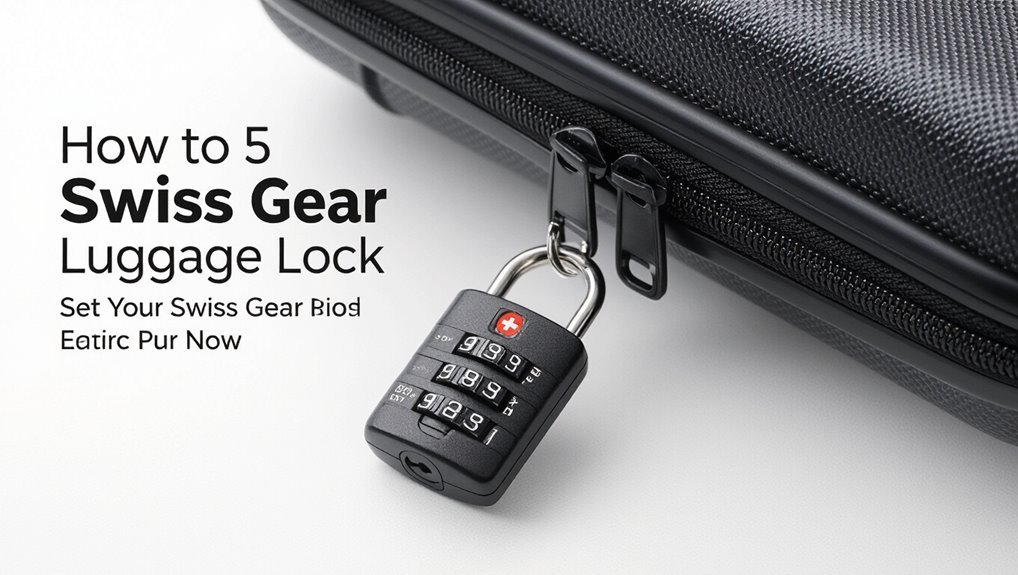
Start by locating the reset button or small pinhole on your Swiss Gear lock—it’s usually on the side or inside the zipper housing.
Press with a paperclip, hold while setting your desired combination, then release.
Rotate dials to lock and scramble numbers to secure.
Test the new code several times before travel.
Note the combination and store it safely.
What Makes Swiss Gear Locks Unique (Parts + TSA IDs)
Think of Swiss Gear locks as compact security systems built into your luggage: they combine a durable latch mechanism, numbered dials, and a reset pin or button so you can set and change codes yourself.
You’ll also find a TSA keyhole with a Travel Sentry or Safe Skies ID, letting authorized agents open luggage without damaging your lock while keeping your belongings secure.
Find the Reset Mechanism on Your Swiss Gear Lock
Now that you know the main parts—a dial assembly, latch, and TSA keyhole—locating the reset mechanism is straightforward.
Look for a small recessed button or pinhole near the shackle base or inside the zipper-tab cavity. You may need a paperclip to press it.
Some models use a sliding switch on the lock body. Confirm the mechanism visually before attempting any changes.
Prepare the Lock
First, inspect the lock for damage or debris so it operates smoothly.
Next, locate the default combination—often 0-0-0 or the code shown on the packaging—and set it as your starting point.
Finally, align the dials precisely to the chosen numbers before you reset the combination.
Inspect The Lock
A quick visual and tactile check will tell you whether the lock’s ready to set: look for cracks, bent dials, stuck shackle, or debris in the keyway/dial grooves, and make sure the current combination turns smoothly.
Wiggle the shackle, rotate each dial through all numbers, clear grit with compressed air or a soft brush, and note any damage that could prevent reliable resetting.
Locate Default Combination
Because most Swiss Gear locks ship with a preset code, check the packaging, user manual, or the hang tag for the default combination before you try resetting it.
Then confirm the code so you don’t lock yourself out.
- Locate the hang tag or manual.
- Note the three-digit default.
- Test the code once to verify it opens the lock.
Align Dials Correctly
Before you set new numbers, make sure the dials are lined up exactly with the indicator mark on the lock body; misaligned dials are the most common cause of failed openings. You should rotate each dial until its notch meets the mark, check alignment twice, then set your new code.
| Dial position | Action needed |
|---|---|
| 1 | Align |
| 2 | Align |
Set a New Combination, Step-by-Step
Start by opening the lock with the factory code (usually 0-0-0). Then hold the reset button or lever in the set position while you dial your new three-digit combination—this guarantees the lock records the new numbers.
Once set, release the reset and test the code several times.
Follow these steps:
- Choose an easy-to-remember number.
- Dial digits firmly and slowly.
- Test before closing luggage.
Reset a Pre-Owned or Unknown-Code Lock
If you’ve got a Swiss Gear lock with an unknown code, don’t panic—you can usually reset it by using the factory default or by manipulating the dials to find the open position, then engaging the reset mechanism while setting a new combination.
Inspect the reset pin or switch, align the shackle to release, then dial through numbers until it pops open.
Set and test your new code.
Choose a Secure, Memorable Code
While you’re setting your new combination, pick numbers you’ll remember but others won’t guess—avoid obvious sequences like 1-2-3 or repeated digits, and don’t use birthdays or easily found personal info.
When setting a new combo, choose memorable but unpredictable numbers—no sequences, repeats, or personal dates.
Choose a pattern meaningful only to you, change it occasionally, and record it securely.
- Use nonsequential digits
- Mix different ranges
- Avoid personal dates
Test Your Swiss Gear Combination Safely
Now that you’ve picked a memorable, hard-to-guess code, make certain it works reliably before you travel.
Test the combination several times with gentle pressure on the shackle, then open and close the zipper or latch to confirm alignment.
Try a few random rotations to make sure it doesn’t slip.
Record the code in a secure place and double-check before packing.
Use the TSA Override Correctly
Locate the TSA keyhole on your Swiss Gear lock so you know where agents can access it without damaging your luggage.
If an officer uses the override, check the combination afterward and reset it if it was changed or left unsecured.
Doing this keeps your bag both TSA-accessible and personally protected.
Locate The TSA Keyhole
1 simple trick will help you find the TSA keyhole quickly: look for a small, rectangular port stamped with “TSA” or bearing the Travel Sentry logo near the lock assembly.
You’ll use it only if inspectors need access. Check these spots:
- Along the zipper head area
- Beside the combination dials
- Under a small protective flap
Locate it before travel.
Reset After Override
After an inspector uses the TSA keyhole, you’ll want to reset your combination so the lock stays secure; start by aligning the dials to the code shown in the lock’s open position.
Press and hold the reset button or slide the reset lever (usually inside the shackle area), set your new three-digit code, then release to lock it in.
Then test the new code several times before closing.
Avoid These Common Swiss Gear Lock Mistakes
Everyone makes small mistakes when setting a Swiss Gear lock, but a few common ones can leave you locked out or compromise your luggage’s security—so check these pitfalls before you set your combination.
Everyone makes small mistakes setting a Swiss Gear lock—avoid common pitfalls to prevent lockouts and weak security.
- Don’t forget to align all dials precisely; half-steps cause failures.
- Avoid easy sequences like 0-0-0 or birthdays.
- Never pull shackle while confirming; that can lock in an unintended code.
Troubleshooting: Lock Won’t Reset or Dials Are Stuck
If your Swiss Gear lock won’t reset or the dials are stuck, start by checking that each dial lines up exactly with the current combination.
Inspect the reset mechanism for debris or a misaligned pin that’s keeping it from engaging. If parts are jammed, try gently working the dials and applying a small amount of graphite or silicone lubricant to free stuck components.
Check Dial Alignment
Start by making certain each dial is lined up exactly on its number—misaligned wheels are the most common reason a Swiss Gear lock won’t reset or the dials feel stuck.
Check and correct alignment gently, then try opening.
Follow steps below:
- Rotate each dial past the number, then back to it slowly.
- Make sure all digits sit flush in the grooves.
- Test the lock after alignment.
Inspect Reset Mechanism
Once the dials are properly aligned but the lock still won’t reset or feels jammed, inspect the reset mechanism next to the shackle.
Look for a small button or lever and make certain it’s fully depressed or returned to its neutral position.
Clear visible debris, check for bent parts, and confirm the mechanism moves smoothly.
If damaged, replace the lock or seek professional repair.
Free Stuck Components
Try gently working the stuck parts free before assuming the worst: wiggle the shackle and twist each dial while applying light pressure to the reset button or lever, and listen for small clicks or feel for movement that indicates internal tumblers are releasing.
If stuck, try:
- Apply graphite or silicone spray sparingly.
- Tap gently to settle pins.
- Repeat dialing while pressing reset until it moves.
Frequently Asked Questions
Can I Rekey the TSA Override on a Swiss Gear Lock?
No, you can’t rekey the TSA override on a Swiss Gear lock; it’s designed for TSA access only. If you want different security, you’ll need to replace the lock or buy luggage with a user-changeable locking mechanism.
Are Replacement Dials Available for Damaged Swiss Gear Locks?
Yes — you can often buy replacement dials for Swiss Gear locks from the manufacturer, authorized dealers, or online marketplaces; you’ll need your model number, and you might contact Swiss Gear support to confirm compatibility and ordering.
Do Swiss Gear Locks Void Luggage Warranties?
They generally won’t void your luggage warranty if the lock is manufacturer-installed or approved, but if you replace or modify locks yourself and cause damage, you might void coverage, so check your luggage maker’s specific warranty terms.
Can Moisture or Saltwater Corrode Swiss Gear Lock Mechanisms?
Yes — moisture and saltwater can corrode Swiss Gear lock mechanisms over time. If you expose them to damp or salty conditions, they’ll seize or rust; you should rinse, dry, and lubricate locks promptly to prevent damage.
Are Smartphone Apps Compatible With Swiss Gear Lock Codes?
No, smartphone apps aren’t compatible with Swiss Gear lock codes; manufacturers don’t provide digital syncing, and the mechanical combination must be set and changed manually, so you’ll use the physical dials rather than an app.
Conclusion
Now you’re ready to set and use your Swiss Gear lock confidently. Remember to locate the reset mechanism, prepare the lock at the factory code, and turn the dials slowly as you set a new combination you’ll actually remember. Test the code several times before relying on it, and use the TSA override only when needed. If something’s stuck, consult the troubleshooting tips or contact Swiss Gear support to avoid damaging your luggage.