Do You Need to Take Out Chargers for Airport Security?
You don’t usually have to take small chargers and cables out at airport security, but you should keep them accessible and visible near the top of your bag. Remove laptops and tablets and place them in bins for separate screening, and keep power banks in your carry-on since they often need inspection. Follow officer instructions if an item is flagged and power devices off when asked. Keep chargers organized to speed things up, and keep going to learn more.
Do You Need to Remove Chargers at Airport Security? (Quick Answer)
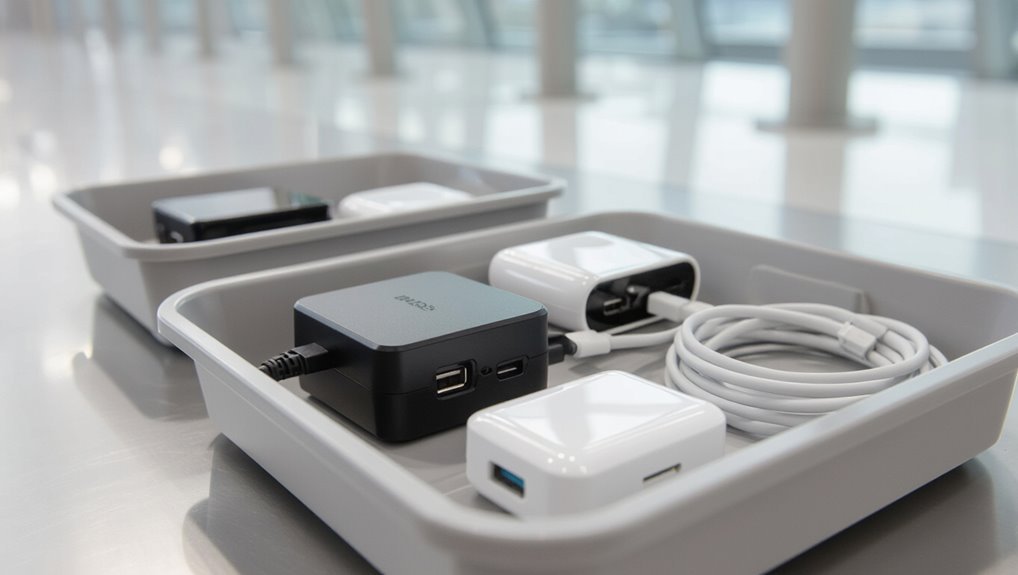
Wondering whether you need to pull chargers out at airport security? You usually don’t have to remove small charging cables or power adapters from your carry-on, but larger electronics with batteries might be inspected separately.
Follow posted TSA or airline instructions at the checkpoint—agents will tell you when to separate items. Keep chargers accessible and organized so screenings go smoothly and delays stay minimal.
Why TSA and Airports Focus on Electronics and Chargers
You’ll notice TSA singles out electronics and chargers because they’re a big part of security screening priority—these items can hide modifications or other threats that show up on X-rays.
You should also know lithium batteries pose fire risks, which is why rules and handling get stricter.
Finally, chargers and cords can be used to conceal components, so officers pay extra attention to make sure nothing dangerous is masked.
Security Screening Priority
Because electronics and their chargers can conceal threats or mimic prohibited items on X-ray images, TSA and airport security prioritize screening them closely.
You’ll be asked to separate devices so officers can get clear scans, speed up inspections, and reduce secondary checks.
This focus helps identify hidden components, modified parts, or dense materials that warrant further evaluation before you pass through security.
Battery Fire Risks
Lithium-ion batteries in phones, laptops, and power banks can catch fire or explode if they’re damaged, shorted, overheated, or improperly carried.
So TSA and airports treat chargers and spare batteries with extra caution. You should keep spare batteries in carry-on luggage, protect terminals, avoid swollen cells, and pack chargers to prevent crushing.
Staff prioritize items that pose thermal risks.
Concealment And Threats
When security teams screen electronics and chargers, they’re not just looking for malfunctioning batteries — they’re checking for hidden threats and concealment tactics that could turn everyday devices into weapons or smuggling tools.
You should cooperate and expect inspections because:
- Chargers can hide compartments or wiring.
- Electronics may conceal liquids, powders, or components.
- Unusual modifications signal tampering or intent.
Which Devices and Chargers Must You Remove (Phones, Laptops, Power Banks)
Wondering which gadgets you’ll need to pull out at the security checkpoint? You should remove laptops and large electronics; phones usually stay unless asked. Power banks often need inspection—carry them in hand luggage. Follow officer instructions.
| Item | Remove? | Notes |
|---|---|---|
| Laptop | Yes | Place in bin |
| Phone | Usually no | May be asked |
| Power bank | Often yes | In carry-on |
| Tablet | Yes | Flat in tray |
When You Can Leave Chargers Inside Your Bag
You can usually leave small, commonly used chargers—like phone or smartwatch cables—inside your carry-on as long as they’re easy to access and not packed with large batteries or loose cells.
Small everyday chargers—like phone or smartwatch cables—can stay in your carry-on if accessible and battery-free.
- Keep cables organized and visible near the top.
- Separate chargers from power banks or spare cells.
- Pack bulky adapters where they won’t obscure other items during screening.
TSA and Global Rules for Chargers at a Glance
How do airport and international screening rules differ for chargers and adapters?
You’ll find TSA generally lets small chargers stay packed, but asks for separate inspection if they’re bulky or attached to devices.
Other countries vary: some mirror TSA, others require removal or additional checks.
Always check airline and departure/arrival security sites beforehand so you meet specific local rules and avoid delays.
How to Prepare Power Banks and External Batteries for Screening
Although airlines and security agencies treat power banks differently than wall chargers, you should always prepare external batteries before screening to speed checks and prevent confiscation.
Follow these steps:
- Power off and stash each bank in carry-on, not checked luggage.
- Label capacity (mAh/Wh) or keep original packaging visible.
- Remove connected cables and place devices separately for X-ray.
Handling Charging Hubs, Multi-Device Chargers, and Adapters
When you’re traveling with charging hubs, multi-device chargers, or lots of adapters, know that airport security treats them like other electronic accessories and may ask you to remove them for inspection.
Pack larger hubs and tangled cables where they’re easily accessible, and keep small adapters in a clear pouch to speed up screening.
If an item looks bulky or contains batteries, be ready to take it out and place it in a bin when requested.
Airport Security Rules
If you’re traveling with charging hubs, multi-device chargers, or a stack of adapters, know that TSA and many international security agencies treat them like other electronic accessories: they generally go through X-ray screening and usually don’t need to be removed from your bag unless asked.
- Expect random checks.
- Keep batteries reachable.
- Follow officer instructions promptly.
Packing and Presentation
Now that you know how security treats charging gear, focus on how you pack and present those items to speed screening and reduce questions.
Place hubs, multi-device chargers, and adapters in an easily accessible pouch or top compartment.
Keep cables coiled, label unfamiliar-looking equipment, and separate battery packs from other electronics.
Remove tangled bundles and present suspicious-looking items separately for quick inspection.
What to Do With Wired Cables, Earbuds, and Magnetic Chargers
Because cables and earbuds often tangle and slow screening, pack them in a clear pouch or dedicated case so TSA agents can quickly inspect them and you can pull them out without rummaging.
Use these tips:
- Coil cords neatly and secure with a band.
- Keep earbuds in their case to avoid loose wires.
- Separate magnetic chargers to prevent sticking and allow clear imaging.
Carry-On vs Checked: How Charger Screening Differs
When you pack chargers in your carry-on, you’ll need to follow device rules like removing large power banks for separate screening.
Checked baggage has limits—many airlines and TSA restrict lithium batteries and large chargers, so some items can’t go below.
Expect different screening procedures: carry-ons get X-ray and possible hand inspection, while checked bags may receive deeper screening or have restricted items removed.
Carry-On Device Rules
Although screening practices can look similar, the rules for chargers differ depending on whether they’re in your carry-on or checked bag.
You should follow carry-on device rules to speed screening:
- Remove laptops and tablets; leave small chargers inside the bag.
- Keep power banks in carry-on; declare if requested.
- Organize cords and adapters to avoid secondary inspection and expedite security.
Checked Baggage Limitations
Checked baggage rules differ from carry-on screening, so you should know what’s allowed and what won’t fly.
You can pack most chargers and cables in checked luggage, but spare lithium batteries and power banks are generally prohibited or restricted.
Label devices and remove large batteries if airline policies require.
Check your carrier’s rules before packing to avoid confiscation or delays.
Security Screening Procedures
Because carry-on and checked screening follow different rules, you should expect chargers to be handled differently depending on which bag they’re in.
You should:
- Keep chargers in carry-on for clearer X-ray imaging and possible removal requests.
- Expect checked bags’ batteries or bulky power banks to face restrictions or extra inspection.
- Declare high-capacity batteries to agents and follow airline limits to avoid confiscation.
Common Reasons Chargers Trigger Extra Inspection
When a charger gets pulled aside at security, it’s usually for a few clear reasons: visible damage, atypical wiring, loose parts, or irregular packaging can make officers suspect a safety or tampering issue, and nonstandard batteries or homemade chargers often raise additional red flags.
You should also expect scrutiny for unfamiliar brands, exposed connectors, excessive tape, or unfamiliar smells that suggest overheating or modification.
Step-by-Step: What to Expect at the Security Checkpoint
When you reach the checkpoint, take laptops, tablets, and larger electronics out of your bag and place them in bins so scanners get a clear view.
Have liquids and small accessories like chargers, cables, and power banks organized and ready to go through screening.
Listen and follow any TSA agent instructions to speed the process and avoid extra inspection.
Remove Electronics From Bags
Curious how to handle your laptop, tablet, or other electronics at the checkpoint?
You’ll need to remove larger devices for separate screening; smaller gadgets can stay in your carry-on unless asked otherwise.
- Take out laptops and tablets and place them in a bin.
- Keep phones and earbuds accessible.
- Follow TSA officer instructions promptly.
Prepare Liquids And Accessories
If you’re carrying liquids, gels, or small accessories, get them ready before you reach the conveyor so screening goes smoothly:
Place liquids in a clear quart-sized bag, seal it, and keep it accessible.
Remove bulky items like headphones, power banks, or cables from pockets and outer compartments.
Consolidate small electronics to one bin so trays move quickly through X-ray scanners.
Follow TSA Agent Instructions
Once your trays and items are on the conveyor, pay attention to the TSA agents guiding the line—they’ll tell you when to step forward, remove shoes or coats, and place laptops or bags in separate bins.
Follow instructions promptly to speed screening and avoid delays. If asked about chargers or electronics, answer clearly.
- Listen closely
- Comply quickly
- Ask politely if unsure
If a Charger Is Flagged: Secondary Screening Explained
When a charger triggers additional screening at security, don’t panic — agents will isolate it for closer inspection to check for hidden components, modifications, or prohibited materials.
You’ll be asked to remove it from your bag, power it off, and possibly demonstrate its function. Cooperate, answer brief questions, and wait patiently; if cleared, you’ll reclaim it and continue to your gate.
Airline and Airport Variations That Change the Process
Because airports and carriers set their own rules and screening setups, what happens to your charger can vary noticeably from one trip to the next.
Because airports and airlines differ, your charger’s screening—and whether you remove it—can change each trip
You should check policies and be ready to adapt.
Consider these common differences:
- Some airports ask you to remove all electronics.
- Others let small chargers stay in bags.
- Airline staff may enforce stricter screening.
Pack Chargers to Speed Security: Simple Packing Steps
Pack chargers so they’re easy to find at the checkpoint: keep them in a clear pouch or a top compartment of your carry-on, group cables together with a strap, and separate power banks so security can inspect them without dumping your bag. You’ll move faster and avoid surprises.
| Item | Tip |
|---|---|
| Cables | Strap together |
| Chargers | Clear pouch |
| Power banks | Separate |
| Adapters | Label clearly |
Airport Packing Checklist: Chargers, Batteries, Cables
Curious what to stow where?
Pack chargers, batteries, and cables thoughtfully so security checks go smoothly.
Keep essentials accessible in a carry-on pouch.
Place spare batteries in original packaging or insulating tape over terminals.
Coil cables neatly to avoid tangles and stow in a small bag.
Remember airline limits on battery watt-hours.
- Carry-on essentials
- Battery safety
- Neat cable storage
Quick Traveler Tips to Speed Through Security With Chargers
Now that you’ve organized chargers, batteries, and cables, make moving through security quicker by keeping a few practical habits in mind. Empty pockets, place electronics on top, and bundle cords. Keep power banks accessible and labeled. Fold soft cases flat to fit bins.
| Item | Action | Tip |
|---|---|---|
| Charger | Bundle | Clip cables |
| Battery | Accessible | Label capacity |
| Phone | Top bin | Remove case |
| Power bank | Separate | Carry-on only |
Troubleshooting: Uncommon Scenarios and Last-Minute Fixes
What if a TSA agent flags a power bank or a charger won’t fit in the bin?
Stay calm, explain it’s removable, and follow instructions.
Try these quick fixes:
- Remove batteries or cables and place them separately.
- Ask for a larger bin or hand inspection.
- Offer to show device specifications or move it to carry-on.
You’ll usually clear it quickly.
Frequently Asked Questions
Can I Gate-Check a Device With a Non-Removable Battery and Its Charger?
Yes — you can gate-check a device with a non-removable battery and its charger, but you’ll usually be required to carry the device onboard if the airline or regulations treat the battery as lithium-ion; check airline rules first.
Do International Layovers Require Removing Chargers for Re-Screening?
Yes — you’ll usually need to remove chargers during international layovers for re-screening, since security rules vary by country; follow the destination’s instructions, cooperate with staff, and keep chargers accessible to speed up the process.
Are Counterfeit or Off-Brand Chargers Treated Differently at Security?
Yes — security can treat counterfeit or off‑brand chargers cautiously; you’ll often be asked to remove them, open packaging, or have them inspected more closely, and in rare cases they might be confiscated if deemed unsafe.
Can I Use a Charger While Waiting Inside the Security Area or Boarding Gate?
Yes — you can use a charger while waiting inside the security area or at the boarding gate, but keep devices observable, avoid obstructing walkways, follow airline or airport staff directions, and unplug when boarding or if asked to stop.
Will TSA Confiscate Chargers That Look Damaged or Swollen?
Yes — TSA can confiscate chargers that look damaged or swollen for safety. You should hand them over if asked; don’t argue. Pack replacements in carry-on and contact your airline or manufacturer about proper disposal or replacement.
Conclusion
In most airports, you won’t need to remove small chargers and cables, but you should take out larger electronics, power banks, and any device with an exposed battery for separate screening. Follow TSA and local rules, pack spare batteries in carry-on, and keep chargers accessible so you can pull them quickly if asked. Doing this speeds through security, avoids delays, and keeps your gear safe — so organize chargers together and know the rules before you fly.